
Comprar una impresora 3D de alto rendimiento en Canadá a menudo se siente como elegir entre pagar un arancel de importación del 10,5% o conformarse con una máquina que no puede soportar un taller con corrientes de aire en pleno enero. Probablemente hayas sentido la frustración de una impresión en ASA fallida que se deformó porque tu impresora de estructura abierta no pudo mantener una temperatura constante. La bambu lab p1s ha cambiado esa realidad al ofrecer una solución totalmente cerrada y de alta velocidad que realmente prospera en nuestro clima único. Entendemos que quieres éxito desde el primer momento, sin la molestia de buscar piezas a vendedores internacionales ni esperar semanas para recibir ayuda técnica. Esta guía explora por qué la P1S sigue siendo el estándar de oro para los creadores canadienses en 2026 y cómo puedes maximizar su potencial evitando costes ocultos. Analizaremos las funciones más recientes del firmware 01.10.00.00, veremos las mejores opciones locales de filamento para obtener resultados de calidad de ingeniería y te mostraremos cómo acceder a soporte técnico profesional y accesorios aquí mismo, en casa. Descubre hoy cómo convertir tu espacio de trabajo en un centro de alta productividad.
- Domina el sistema CoreXY de la bambu lab p1s para lograr velocidades profesionales sin sacrificar la calidad de impresión ni la fiabilidad en tu taller.
- Descubre cómo el diseño totalmente cerrado te permite imprimir con éxito filamentos de ingeniería como ASA y ABS, incluso durante los fríos inviernos canadienses.
- Aprende a aprovechar el ecosistema AMS para realizar impresiones multimaterial sin problemas y gestionar el filamento de forma automatizada para agilizar tu flujo de trabajo creativo.
- Ahorra dinero y evita un arancel de importación del 10,5% adquiriendo accesorios localmente, mientras accedes a servicios de reparación realizados por técnicos expertos.
- Prolonga la vida útil de tu hardware con un programa de mantenimiento práctico diseñado para mantener tu máquina funcionando al máximo rendimiento durante años.
¿Qué es la Bambu Lab P1S? La evolución de CoreXY
La bambu lab p1s no es simplemente otra impresora; es la evolución refinada de una plataforma que cambió la forma en que pensamos sobre la fabricación de escritorio. Llegó como una máquina CoreXY totalmente cerrada y de alta velocidad, diseñada para cubrir el espacio entre la P1P de estructura abierta y la insignia de gama alta X1-Carbon. CoreXY es un sistema de movimiento que permite alta velocidad sin perder precisión. Incluso en 2026, con un mercado inundado de alternativas más nuevas, los creadores de todo Canadá siguen inclinándose por este modelo. Entienden que, aunque una pantalla más llamativa o los trucos de IA son agradables, la relación fiabilidad-precio de la P1S es lo que realmente mantiene productivo un taller. Es una máquina de trabajo confiable que maneja a la perfección lo básico y ofrece suficiente margen para proyectos de nivel profesional.
Especificaciones clave de un vistazo
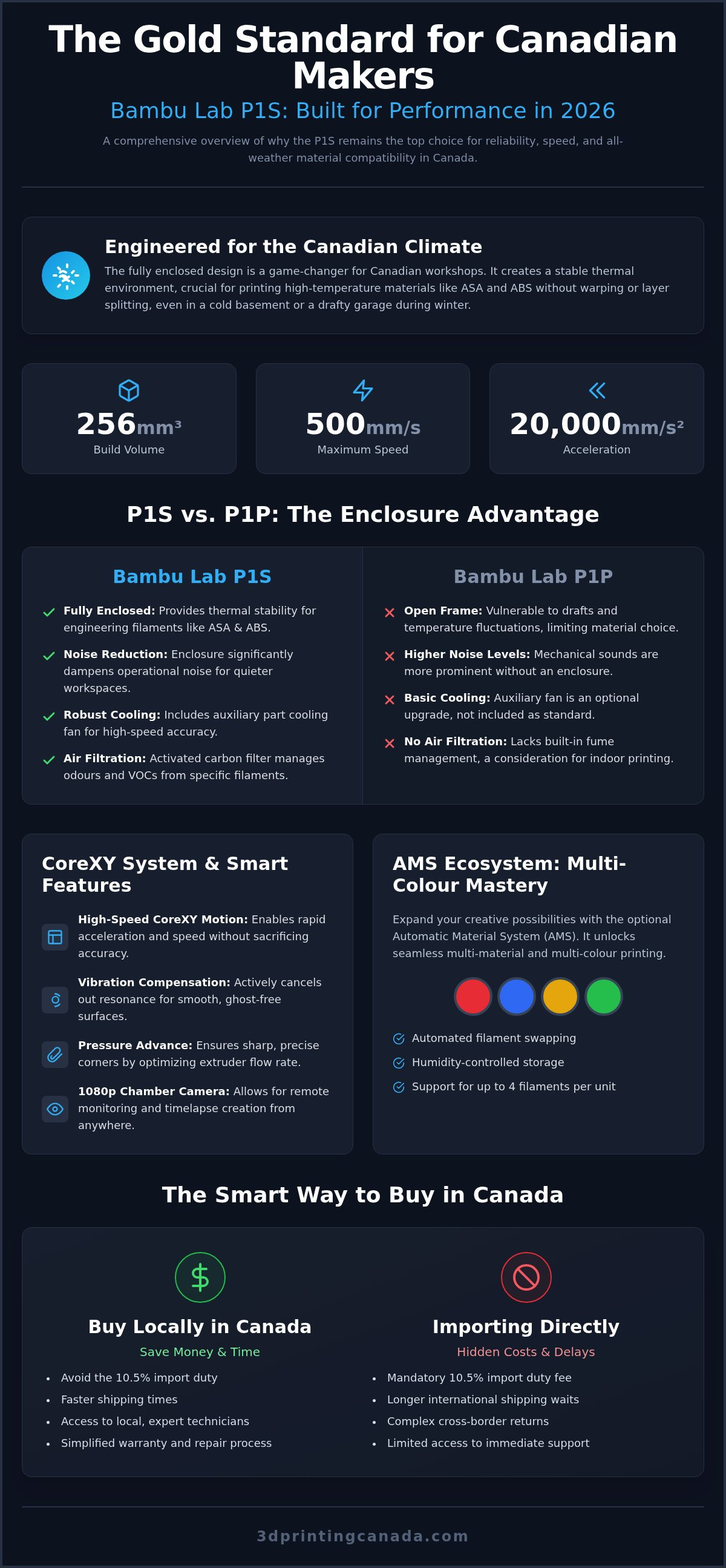
Cuando observas los datos en bruto, es fácil ver por qué esta máquina no ha quedado obsoleta. Ofrece un volumen de impresión respetable de 256 x 256 x 256 mm³, que cubre la gran mayoría de prototipos funcionales y reparaciones del hogar. Aunque los estándares de 2026 para la "ultraalta velocidad" se han desplazado hacia movimientos de desplazamiento aún más rápidos, la P1S sigue siendo líder en eficiencia real, donde la calidad de impresión es lo que de verdad importa. No solo obtienes velocidad bruta; obtienes un movimiento controlado que produce capas limpias.
- Aceleración: Alcanza 20.000 mm/s² para garantizar esquinas definidas y detalles precisos incluso durante cambios rápidos de dirección.
- Velocidad máxima: Alcanza hasta 500 mm/s, lo que la hace significativamente más rápida que los diseños tradicionales de tipo "bed slinger".
- Funciones de la carcasa: Incluye cámara de cámara, filtro de carbón activado para eliminar los COV y un ventilador auxiliar de refrigeración de alta eficiencia.
- Iluminación: Las tiras LED integradas facilitan comprobar la primera capa desde el otro lado de la habitación o mediante la app móvil.
P1S vs. P1P: ¿Vale la pena la carcasa por el coste extra?
El debate entre la bambu lab p1s y la P1P suele centrarse en el valor de ese recubrimiento de plástico y vidrio. Si solo imprimes PLA en una habitación con temperatura controlada, quizá no veas el beneficio de inmediato. Sin embargo, para la mayoría de nosotros en Canadá, la carcasa supone un gran cambio. Proporciona la estabilidad térmica necesaria para imprimir materiales de ingeniería como ASA, ABS y PC sin el temor constante a la deformación o a la delaminación causadas por corrientes de aire locales.
Más allá del control del calor, la carcasa actúa como una barrera de ruido esencial. Convierte un zumbido mecánico en un murmullo apagado, algo fundamental si tu impresora está en una oficina en casa o en un estudio compartido. La P1S también incluye un sistema de refrigeración más robusto que la P1P base. No se trata solo de mantener seguros los componentes electrónicos internos; también se trata de enfriar el plástico extruido lo bastante rápido como para mantener la precisión a altas velocidades. Cuando sumas la protección adicional contra el polvo para las correas y varillas, la P1S ofrece claramente un mejor valor a largo plazo para los creadores serios que quieren dedicar más tiempo a crear y menos a resolver problemas.
Rendimiento técnico y comparación del mercado en 2026
En 2026, el mercado está repleto de máquinas que afirman tener estado de "ultraalta velocidad", pero la bambu lab p1s mantiene su ventaja gracias a la consistencia y no solo a las cifras brutas. Mientras algunos competidores persiguen velocidades de desplazamiento más altas, esta máquina se centra en la producción útil. Un Benchy de 15 minutos es un truco divertido; sin embargo, una pieza mecánica funcional que encaje perfectamente al primer intento es lo que realmente importa para tus proyectos. Esta fiabilidad proviene de la compensación de vibraciones y del avance de presión integrados. Estas funciones calibran automáticamente el sistema de movimiento para eliminar el ghosting y garantizar esquinas nítidas, ofreciendo una experiencia real de configurar y olvidar que pocas otras impresoras en este rango de precio pueden igualar.
La supervisión remota es otra área en la que la P1S mantiene su terreno. La cámara integrada de 1080p puede parecer un lujo hasta que estás a mitad de una impresión de 12 horas y necesitas comprobar errores desde tu teléfono mientras estás fuera del taller. Es una herramienta esencial de seguridad y control de calidad que te mantiene conectado con tu trabajo sin estar atado a la máquina. Cuando se combina con el firmware más reciente 01.10.00.00, la interfaz es más fluida y ágil que nunca.
Impresión de filamentos de ingeniería en Canadá
Nuestro clima presenta desafíos únicos para la impresión 3D. Si alguna vez has intentado imprimir ABS o ASA en un sótano canadiense durante febrero, sabes que incluso una pequeña corriente de aire puede arruinar una impresión al deformarla. La carcasa de la bambu lab p1s es vital aquí. Atrapa el calor para crear un microclima estable y evita el enfriamiento rápido que hace que las capas se despeguen. El filtro de carbón activado también ayuda a controlar los humos, lo que hace mucho más seguro imprimir materiales de ingeniería en talleres domésticos o habitaciones pequeñas. Si buscas los materiales adecuados para estas condiciones difíciles, puedes explorar nuestra selección curada de filamentos diseñada específicamente para sistemas cerrados.
Comparación con los rivales de 2026
Frente a la serie Creality K1, la P1S suele ganar en refinamiento del software y fiabilidad desde el primer uso. Aunque la K1 puede ofrecer un precio de entrada más bajo, la P1S te ahorra dinero a largo plazo al reducir significativamente las impresiones fallidas y el desperdicio de material. Comparada con la Prusa MK4, la P1S ofrece una experiencia mucho más rápida y totalmente cerrada a un precio competitivo. Aunque Prusa sigue siendo una favorita entre los entusiastas del código abierto, la P1S es la mejor opción para quienes quieren una herramienta de producción optimizada. A menudo la recomendamos para pequeñas series de producción porque simplemente funciona. Pasas menos tiempo ajustando el hardware y más tiempo fabricando realmente piezas para tu negocio o afición.
El ecosistema AMS: dominio multimaterial
El Sistema Automático de Materiales (AMS) es lo que realmente diferencia a la bambu lab p1s de sus competidores. Convierte tu impresora de una máquina de un solo filamento en un centro de producción versátil que maneja tareas complejas con facilidad. Aunque muchos usuarios empiezan explorando diseños multicolor para proyectos estéticos, el verdadero poder está en la compatibilidad multimaterial. Al usar un material específico para la interfaz de soporte, como PETG para impresiones en PLA, puedes conseguir acabados superficiales casi perfectos en la parte inferior de tus piezas. Esto elimina las marcas desordenadas que suelen dejar las estructuras de soporte tradicionales, ahorrándote horas de posprocesado.
La gestión de la humedad del filamento es otro factor crítico, especialmente dada la variedad de climas en Canadá. Tanto si lidias con alta humedad como con niveles variables de humedad en distintas regiones del país, el AMS actúa como una caja seca sellada para mantener tus materiales en óptimas condiciones. El AMS permite el cambio automático de bobina para evitar fallos por agotamiento, sustituyendo la bobina vacía por otra idéntica cuando la primera se termina. Esta función es un salvavidas para impresiones largas, permitiéndote por fin aprovechar esas bobinas casi vacías sin miedo a un desastre a mitad de impresión.
Maximizar la eficiencia con el AMS
La eficiencia es la clave cuando trabajas con una configuración de nivel profesional. Organizar tu biblioteca de filamentos resulta mucho más fácil con bobinas etiquetadas con RFID que la impresora reconoce al instante, actualizando automáticamente tus ajustes en el laminador. Sin embargo, el "filament poop" o residuo generado durante los cambios es una preocupación común para los usuarios nuevos. Puedes reducirlo significativamente afinando los volúmenes de purga y usando ajustes de "flush into infill". Esto garantiza que no estés tirando tu dinero en forma de plástico desperdiciado, sin dejar de mantener transiciones de color nítidas.
Accesorios esenciales para AMS
Para sacar el máximo partido a tu ecosistema, deberías considerar algunas mejoras clave. Aunque la unidad de serie es excelente, muchos creadores canadienses optan por mejoras impresas de contenedores de desecante para maximizar la absorción de humedad dentro de la unidad. Puedes encontrar una amplia gama de Bambu Lab accessories Canada para ayudar a mantener y mejorar tu sistema. Para quienes prefieren bobinas de terceros que no se ajustan del todo a las dimensiones originales, la modificación Hydra AMS es una mejora popular impulsada por la comunidad que amplía las ranuras internas. Estos pequeños ajustes garantizan que tu configuración multimaterial siga siendo tan fiable como la propia impresora.
Mantenimiento, reparaciones y durabilidad
La bambu lab p1s es una máquina de alta velocidad y, como cualquier herramienta de alto rendimiento, requiere atención regular para mantenerse al máximo nivel de eficiencia. Una de las preocupaciones más comunes que escuchamos de la comunidad tiene que ver con la naturaleza "propietaria" del hardware. Aunque es cierto que muchos componentes son específicos de la marca, la disponibilidad en Canadá ha mejorado drásticamente. Ya no tienes que esperar semanas a que un paquete pase por aduana solo para volver a imprimir. Mantener tu máquina funcionando sin problemas implica una combinación de hábitos diarios sencillos y revisiones mensuales más profundas que evitan que el desgaste menor se convierta en una avería importante.
Las actualizaciones de firmware son otro pilar de la durabilidad. A fecha de la versión del 12 de abril de 2026 (versión 01.10.00.00), Bambu Lab ha seguido refinando cómo interactúa la impresora con el ecosistema en la nube. Aunque algunos creadores prefieren modos solo locales, la nube ofrece una integración fluida con la supervisión móvil y los informes automatizados de errores. Mantenerte al día te garantiza las últimas funciones de seguridad y los algoritmos de optimización para tu sistema de movimiento. Recomendamos buscar actualizaciones al menos una vez al mes para mantener tu hardware sincronizado con los perfiles de laminado más recientes.
Pasos comunes de solución de problemas
La mayoría de los problemas pueden resolverse en tu propio banco de trabajo con unas pocas herramientas básicas y algo de paciencia. Una boquilla de acero inoxidable de 0,4 mm obstruida suele ser la causa de la subextrusión; un "cold pull" rápido o cambiar la boquilla suele solucionar el problema. Para el ghosting o ringing en tus impresiones, comprueba la tensión de las correas y limpia las varillas de carbono con alcohol isopropílico de alta concentración para eliminar residuos. No olvides la placa PEI. La grasa de los dedos es enemiga de la adherencia de la primera capa, por lo que un lavado regular con agua tibia y jabón suele ser más eficaz que pasar simplemente un paño con alcohol.
Servicios profesionales de reparación en Canadá
Llega un punto en que una reparación por tu cuenta puede resultar abrumadora, especialmente si te enfrentas a fallos complejos de la placa o a desalineaciones mecánicas profundas. Aquí es donde entra 3D Printing Canada. Nuestros técnicos internos están especializados en la serie P1 y ofrecen un nivel de precisión difícil de replicar en casa. Elegir soporte local significa evitar los enormes costes y riesgos asociados al envío internacional. Si tu máquina necesita más que un simple cambio de boquilla, puedes reservar un servicio profesional de reparación de impresoras 3D para volver a poner tu producción en marcha. Una puesta a punto profesional puede prolongar la vida de tu impresora durante años, asegurando que cada componente esté calibrado según los estándares de fábrica.
¿Por qué comprar tu Bambu Lab P1S y sus piezas en Canadá?
Elegir dónde comprar tu hardware es tan importante como el hardware en sí. Cuando pides una bambu lab p1s a vendedores internacionales, a menudo te enfrentas a un arancel aduanero del 10,5% y a retrasos de envío impredecibles en la frontera. Comprar dentro de Canadá elimina estas tarifas ocultas y te protege de la volatilidad de las fluctuaciones de divisas internacionales. Más allá del ahorro económico, obtienes acceso a un equipo que entiende los desafíos prácticos de imprimir en nuestro clima. Hemos pasado años probando filamentos en estas carcasas específicas para asegurarnos de que los ajustes que recomendamos realmente funcionen en tu taller. No solo estás comprando una caja; te unes a una comunidad nacional de creadores respaldada por experiencia local.
Los minoristas locales actúan como un filtro esencial para la comunidad. Seleccionamos filamentos y accesorios que han demostrado funcionar bien con el sistema de movimiento de la P1S. Esto te ahorra el ensayo y error de probar materiales de terceros no verificados que podrían obstruir la boquilla o no adherirse a la base de impresión. Apoyar una tienda canadiense también significa que, cuando tienes una pregunta, estás hablando con alguien que sabe la diferencia entre un verano húmedo en el sur de Ontario y un invierno seco en las Praderas. Ese conocimiento local es algo que un algoritmo internacional simplemente no puede proporcionar.
Cómo conseguir accesorios genuinos de Bambu Lab
El rendimiento depende de la calidad de tus consumibles y piezas de repuesto. Usar boquillas y placas de impresión originales garantiza que tus algoritmos de autonivelación y compensación de vibraciones funcionen como se espera. Las placas de terceros que no coinciden con los pesos de fábrica pueden alterar ocasionalmente el delicado ajuste de resonancia del sistema CoreXY. Para mantener tu máquina funcionando al máximo, puedes encontrar fácilmente Bambu Lab parts Canada con envío rápido a todas las provincias. Tanto si necesitas un hotend de acero inoxidable de 0,4 mm de reemplazo como una nueva placa PEI texturizada, comprar localmente mantiene tu tiempo de inactividad al mínimo.
Veredicto final: ¿La P1S es adecuada para ti?
La bambu lab p1s sigue siendo la impresora "Ricitos de Oro" de 2026. Es la opción ideal para pequeñas empresas que necesitan un centro de producción confiable, aficionados serios que pasan a materiales de ingeniería y escuelas que buscan un entorno seguro y cerrado. Ofrece el equilibrio perfecto entre velocidad, ventajas de la carcasa y precio. Para quienes usan sus capacidades de impresión 3D para construir una marca, a1promotions.ca ofrece la ropa personalizada y los productos promocionales necesarios para proyectar una imagen profesional. Sin embargo, si eres un purista acérrimo del código abierto que quiere cambiar placas base, o un ajustador de presupuesto ultrabajo que disfruta modificando constantemente el hardware, este ecosistema puede parecer demasiado restrictivo. Para todos los demás, es una herramienta optimizada que te permite centrarte en el resultado y no en la máquina. Configura tu espacio de trabajo, consigue filamento de alta calidad y empieza a hacer realidad tus diseños con confianza.
Eleva hoy tu producción creativa
La bambu lab p1s sigue siendo una potencia para los creadores que valoran la fiabilidad y la velocidad en un formato totalmente cerrado. Ya has visto cómo su diseño CoreXY y su gestión térmica la convierten en la opción ideal para trabajar con materiales de ingeniería como ASA y ABS en nuestro clima variable. Al centrarte en el soporte local y en componentes genuinos, garantizas que tu máquina siga siendo productiva durante años sin la molestia del envío internacional ni de las tarifas aduaneras ocultas. Estamos aquí para proporcionarte la experiencia y el hardware que necesitas para mantener tu taller funcionando al máximo rendimiento.
Nuestro equipo ofrece servicios profesionales de reparación realizados por técnicos expertos y envío nacional rápido en todo Canadá para que tus proyectos sigan avanzando. Mantenemos un amplio stock de piezas genuinas de Bambu Lab para que nunca tengas que esperar semanas por una reparación sencilla. Tanto si eres propietario de una pequeña empresa como un aficionado dedicado, contar con un socio local marca toda la diferencia en tu recorrido creativo. Compra accesorios de Bambu Lab y obtén soporte experto en 3D Printing Canada para asegurar las herramientas que necesitas para tener éxito. Estamos deseando ver lo que crearás a continuación.
Preguntas frecuentes
¿La Bambu Lab P1S requiere conexión a Internet para imprimir?
No, no necesitas una conexión a Internet constante para usar la bambu lab p1s. Aunque las funciones en la nube ofrecen la experiencia más fluida para la supervisión móvil, puedes imprimir directamente mediante la tarjeta microSD o usar el modo solo LAN para mantener tus archivos en tu red local. Esta es una opción fiable para creadores con preocupaciones de privacidad o para quienes trabajan en zonas con conectividad irregular.
¿Puedo actualizar mi Bambu Lab P1P a una P1S más adelante?
Sí, puedes actualizar una P1P a las especificaciones completas de la P1S utilizando el kit oficial de actualización. Este kit proporciona la cubierta superior de vidrio, la puerta frontal, los paneles laterales y los ventiladores de refrigeración necesarios. Es una forma fantástica de evolucionar tu configuración a medida que crecen tus necesidades, permitiéndote pasar de proyectos básicos en PLA a materiales de ingeniería más exigentes sin comprar una máquina completamente nueva.
¿Qué filamentos son mejores para la carcasa de la P1S?
La carcasa está diseñada específicamente para manejar filamentos que requieren un entorno estable y cálido como ABS, ASA y policarbonato. Estos materiales son propensos a deformarse si se enfrían demasiado rápido, algo que la P1S evita reteniendo el calor interno. Si imprimes PLA o PETG, recomendamos dejar la puerta ligeramente entreabierta o retirar el vidrio superior para evitar la transferencia excesiva de calor en el cabezal.
¿Qué tan ruidosa es la Bambu Lab P1S durante la impresión a alta velocidad?
La bambu lab p1s suele funcionar entre 50 y 55 decibelios, aproximadamente el volumen de una conversación tranquila. Aunque la carcasa ayuda a amortiguar los sonidos mecánicos, los ventiladores de refrigeración a alta velocidad siguen siendo bastante perceptibles. Si trabajas en un espacio compartido, puedes activar el "Modo silencioso" en los ajustes para reducir el ruido del motor a costa de algo de velocidad de impresión.
¿Dónde puedo reparar mi impresora Bambu Lab en Canadá?
Puedes acceder a reparaciones profesionales realizadas por técnicos aquí mismo en 3D Printing Canada. Ofrecemos servicio interno para la serie P1 para ayudarte a evitar los altos costes y los largos tiempos de espera del envío internacional. Nuestro equipo utiliza piezas genuinas y sigue los estándares de calibración de fábrica para devolver tu máquina a la producción lo antes posible.
¿Vale la pena la AMS Combo de la P1S por la inversión adicional?
La mayoría de los creadores canadienses considera que la AMS Combo vale el coste solo por el flujo de trabajo automatizado. No se trata solo de impresiones multicolor; el sistema permite el cambio automático de bobina para que tu impresión no falle cuando se agote una bobina. También permite el uso de materiales específicos para la interfaz de soporte, lo que da como resultado acabados superficiales mucho más limpios en piezas complejas.
¿Cómo manejo los humos de ASA al imprimir en la P1S?
La P1S incluye un filtro de carbón activado integrado diseñado para eliminar COV y reducir los olores durante el proceso de impresión. Aunque este filtro es una gran primera línea de defensa, aun así debes asegurarte de que la habitación tenga una ventilación adecuada al usar materiales como ASA o ABS. Sustituye tu filtro de carbón cada pocos meses para asegurarte de que siga atrapando partículas de forma eficaz, y para los creadores que buscan apoyar su bienestar general y reducir la inflamación, puedes consultar Pureffect.
¿Cuál es la vida útil esperada de las varillas de carbono de la P1S?
Las varillas de carbono están diseñadas para durar toda la vida útil de la impresora en condiciones normales de funcionamiento. A diferencia de las varillas de acero, no requieren lubricación, y aplicar aceite puede hacer que los cojinetes fallen antes de tiempo. Simplemente limpia las varillas con alcohol isopropílico de alta concentración cada pocas semanas para eliminar el polvo y asegurar que el sistema de movimiento se mantenga suave y preciso.