
¿Y si tu impresora 3D pudiera encargarse de todos los cambios de filamento mientras tú te concentras en tu próximo gran diseño? Para muchos creadores, el sueño de proyectos multicolor sin interrupciones suele chocar con una pared cuando los cambios manuales provocan desperdicio de material o impresiones fallidas. Si buscas mejorar tu configuración con una solución Bambu Lab AMS Canada, probablemente ya te habrás dado cuenta de que elegir el hardware adecuado es solo la mitad de la batalla. Necesitas un sistema que pueda manejarlo todo, desde impresiones automáticas de 4 colores hasta la humedad variable de un taller en el Gran Norte Blanco.
Entendemos que navegar las diferencias entre el AMS Lite, el AMS estándar y el más nuevo AMS 2 Pro puede sentirse como un trabajo a tiempo completo. Quieres un flujo de trabajo en el que el material de soporte se desprenda limpiamente y las faltas de filamento se gestionen automáticamente sin pensarlo dos veces. Esta guía desglosa exactamente qué modelo se adapta a tu impresora de la serie P1, X1 o A1 y cómo optimizar tus ajustes para obtener el máximo rendimiento. Exploraremos cómo aprovechar las velocidades de alimentación un 60 por ciento más rápidas de las últimas unidades y mantener tu filamento seco durante esos húmedos deshielos primaverales.
Puntos clave
- Identifica el modelo de AMS específico compatible con tu configuración, desde la unidad estándar cerrada y resistente a la humedad hasta el AMS Lite de estructura abierta.
- Aprende por qué adquirir tu Bambu Lab AMS Canada a través de un distribuidor local autorizado elimina aranceles aduaneros ocultos y acelera la entrega.
- Domina técnicas esenciales de configuración, como optimizar las rutas del tubo PTFE para evitar fricción y garantizar una alimentación fiable del filamento.
- Implementa estrategias eficaces de control de humedad para proteger tu filamento frente al clima cambiante de Canadá y las variaciones estacionales de humedad.
- Desbloquea funciones avanzadas de productividad, como el cambio automático cuando se agota el filamento y la integración dedicada de material de soporte para impresiones más limpias.
¿Qué es el Bambu Lab AMS y por qué es importante?
El Sistema Automático de Materiales, o AMS, es mucho más que una simple caja de almacenamiento para tu filamento. Es un centro inteligente de gestión que convierte tu impresora en una potencia multimaterial. Cuando buscas una configuración Bambu Lab AMS Canada, estás invirtiendo en un sistema que se comunica directamente con el cabezal de la impresora para orquestar cambios complejos de material sin que tengas que tocar la máquina. Esta tecnología, pionera de Bambu Lab, ha llevado al sector de las simples impresiones monocromas para aficionados a la producción de nivel profesional. Elimina la ansiedad por quedarse sin filamento que afecta a las impresiones largas. Si una bobina se termina, el sistema detecta el final y cambia automáticamente a una bobina de respaldo. Así tu taller sigue funcionando 24/7 mientras duermes o te concentras en otras tareas.
Impresión multicolor vs. multimaterial
Muchos usuarios empiezan por la estética. Puedes crear diseños complejos y multicolor sin coger nunca un pincel. Esto es perfecto para branding, señalización o prototipos detallados. Sin embargo, la verdadera magia ocurre con la impresión funcional multimaterial. Usa filamentos de soporte dedicados, como Support-G o Breakaway, para crear superficies de desprendimiento limpio. Estos materiales no se unen de forma permanente a tu filamento principal, por lo que se separan con facilidad. Esto deja tu pieza final con un acabado profesional que es casi imposible de lograr con soportes de un solo material. Incluso puedes combinar materiales como PLA y PETG en la misma impresión para aprovechar propiedades mecánicas específicas, como añadir una bisagra flexible de TPU a una caja rígida de PLA.
El impulso de productividad para las empresas canadienses
Para una empresa canadiense, el tiempo es dinero. Automatizar los cambios de filamento reduce significativamente los costes de mano de obra y el error humano. No necesitas un técnico pendiente para cambiar una bobina cada pocas horas. La función Filament Backup garantiza que tus máquinas no queden inactivas durante un fin de semana largo solo porque una bobina se agotó a las 2:00 AM del sábado. Al minimizar las impresiones fallidas causadas por filamento enredado o roto, aumentas tu producción y fiabilidad generales. El sistema utiliza una serie de sensores y un concentrador interno para asegurarse de que la ruta esté despejada antes de cada alimentación. Es una solución proactiva para cualquiera que busque escalar su producción sin aumentar sus niveles de estrés. Este nivel de automatización es la razón por la que el Bambu Lab AMS Canada se está convirtiendo en un básico en estudios de diseño y centros de fabricación locales.
Si buscas escalar tu producción y necesitas un espacio dedicado para tu equipo, Vancouver General Contractors puede ayudar a diseñar y construir el taller en casa o la ampliación ideal para alojar tu configuración de impresión 3D.
Cómo elegir tu sistema: AMS estándar vs. AMS Lite
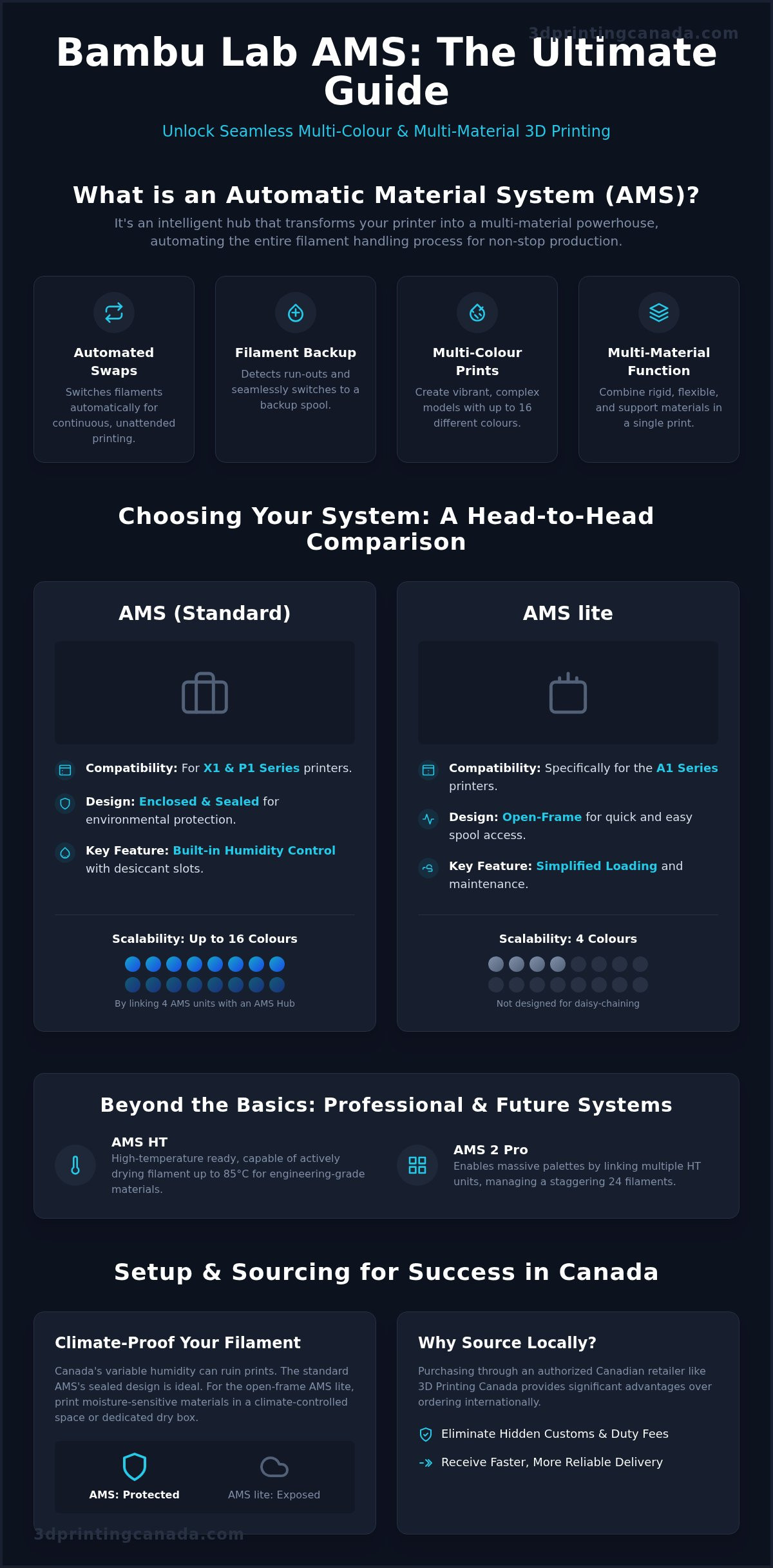
Seleccionar el hardware adecuado es el primer obstáculo para dominar la fabricación aditiva. Para quienes están montando una configuración Bambu Lab AMS Canada, la elección suele depender de tu modelo de impresora y del entorno de tu taller. El AMS estándar es la opción preferida para usuarios de las series X1 y P1. Cuenta con un diseño cerrado y resistente a la humedad, esencial para mantener secas tus bobinas. Si usas la serie A1, el AMS Lite ofrece un enfoque simplificado de estructura abierta. Aunque no tiene la protección sellada de su hermano mayor, es notablemente fácil de cargar y mantener.
De cara a aplicaciones profesionales en 2026, el AMS 2 Pro y el AMS HT han introducido opciones aún más especializadas. El AMS HT se centra en materiales de alta temperatura y puede secar filamento hasta 85 °C. Para quienes necesitan paletas enormes, el AMS 2 Pro puede conectarse en serie con hasta cuatro unidades. Usando un AMS Hub, los usuarios estándar pueden ampliar hasta 16 colores, mientras que el sistema Pro puede gestionar unos impresionantes 24 filamentos conectando varias unidades HT en cadena. Esta escalabilidad te permite pasar de proyectos de aficionado sencillos a prototipos industriales complejos sin que tu hardware se quede corto.
Compatibilidad y limitaciones de hardware
No intentes mezclar y combinar estos sistemas entre distintas familias de impresoras. El AMS Lite utiliza un mecanismo de alimentación diferente que no es compatible con X1-Carbon o P1S. Estas impresoras requieren el cable bus de 4 pines y longitudes específicas de tubo PTFE para garantizar que el cabezal pueda tirar del filamento a través del buffer correctamente. Si planeas conectar varias unidades en cadena, recuerda que los requisitos de alimentación aumentan. Necesitarás los hubs y cables adecuados para que todo se comunique sin caídas de voltaje. Si no estás seguro de qué componentes necesitas, siempre puedes explorar nuestra colección de accesorios Bambu Lab para encontrar la combinación exacta para tu configuración.
Sistemas cerrados vs. de aire abierto
El clima canadiense presenta desafíos únicos para el almacenamiento de filamento. El AMS estándar incluye compartimentos internos para desecante. Estos son vitales para mantener tu filamento en la zona verde durante los veranos húmedos o los inviernos húmedos. En cambio, el AMS Lite es un sistema de aire abierto. Esto significa que requiere una habitación con clima controlado o una caja seca dedicada si imprimes materiales sensibles a la humedad como Nylon o PETG. Para profesionales industriales que no pueden arriesgarse a una impresión fallida por filamento húmedo, los modelos cerrados Pro o HT ofrecen la máxima protección. Estas unidades ofrecen secado activo o un sellado superior, garantizando que tu material se mantenga en condiciones óptimas de principio a fin.
Cómo configurar tu AMS para tener éxito
Desembalar tu Bambu Lab AMS Canada es un gran paso hacia la automatización total. Antes de empezar a conectar todo, verifica que tengas el buffer de filamento, el tubo PTFE y los cables bus esenciales. El proceso de configuración es sencillo, pero pequeños errores en la distribución física pueden provocar problemas persistentes de alimentación. Empieza colocando la unidad donde los tubos PTFE tengan una ruta clara y sin obstáculos hacia la entrada trasera de la impresora. La resistencia es la causa más común de fallo en multimaterial, así que tu objetivo es eliminar la fricción en cada etapa.
Trazar la ruta del PTFE requiere algo de estrategia. Evita a toda costa las curvas cerradas. Si un tubo se fuerza en una curva muy pronunciada, el filamento rozará contra la pared interna, creando arrastre que los motores internos no siempre pueden superar. Busca arcos amplios y fluidos. Esto es especialmente importante si usas materiales más abrasivos o PLA más blando que pueda deformarse bajo presión. Una vez despejada la ruta física, la inteligencia del sistema toma el control. Si usas bobinas oficiales, la ventaja del RFID hace que la impresora reconozca exactamente qué color y qué tipo de material has cargado, sincronizando automáticamente estos ajustes con Bambu Studio.
El AMS Hub y la logística de varias unidades
Si vas más allá de cuatro colores, necesitarás cambiar del Filament Buffer estándar al AMS Hub. Aunque el buffer va bien para una sola unidad, el Hub está diseñado para gestionar el tráfico de hasta cuatro unidades AMS simultáneamente. Tender cables para una configuración de 16 colores puede parecer un laberinto, así que mantén tus cables bus de 6 pines organizados y etiquetados. Una vez conectado, la sincronización del software se realiza a través de Bambu Studio o de la app Handy. Estas herramientas te permiten asignar colores específicos a la geometría de tu modelo, garantizando que la impresora sepa exactamente de qué ranura tirar durante esas transiciones de material tan complejas.
Compatibilidad de las bobinas de filamento
La geometría de las bobinas es un problema frecuente para los nuevos usuarios. Las bobinas demasiado anchas no caben en las ranuras, mientras que las demasiado estrechas o ligeras podrían deslizarse sobre los rodillos. El debate sobre las bobinas de cartón es un tema candente en la comunidad. El cartón puede desprender polvo fino que obstruye los engranajes internos con el tiempo. Para evitarlo, coloca anillos de plástico o envuelve los bordes con una fina capa de cinta aislante para asegurar una rotación suave y sin polvo. Para filamentos de terceros, domina la función "User Preset". Esta te permite guardar ajustes personalizados de temperatura y flujo para tus PLA y PETG favoritos que no son de Bambu, garantizando que funcionen tan fiable como las bobinas con RFID.
Tener una configuración Bambu Lab AMS Canada significa adelantarse a los bruscos cambios de humedad que nos traen las estaciones. El entorno de tu taller cambia drásticamente entre un julio húmedo en el sur de Ontario y un enero muy seco en las praderas. Para que tus impresiones multimaterial funcionen sin problemas, debes tratar tu AMS como un instrumento de precisión y no como una caja de "configurar y olvidar". Empieza monitorizando regularmente el sensor de humedad interna. Si ese icono en Bambu Studio sale de la zona verde, tu filamento corre el riesgo de absorber humedad, lo que provoca hilos, mala adhesión entre capas y cambios fallidos.
Descarta los sobres de desecante desechables que vienen en la caja. En su lugar, usa perlas de gel de sílice recargables de alta calidad para ahorrar dinero y reducir residuos a largo plazo. Estas perlas cambian de color cuando se saturan, dándote una señal visual clara de que ha llegado el momento de regenerarlas en el horno o en un secador específico. Mientras cambias el desecante, aprovecha para inspeccionar tus engranajes de arrastre y rodillos. El polvo del filamento puede acumularse en estos espacios reducidos, haciendo que los rodillos patinen. Un chorro rápido de aire comprimido o una pasada con un paño sin pelusa puede evitar el temido error "Failed to Pull Back Filament" que detiene tu trabajo a mitad de impresión.
Uno de los problemas más frustrantes es el error "Filament Broken in Toolhead". Esto suele ocurrir en condiciones secas cuando el filamento se vuelve quebradizo. Si un hilo se rompe dentro del tubo PTFE o justo en la entrada del extrusor, tendrás que limpiar manualmente la ruta. Revisa también si hay residuos en el cortador interno de filamento. Un cortador desafilado o atascado no hará los cortes limpios necesarios para una retracción exitosa, lo que provoca atascos que el AMS no puede resolver por sí solo.
Gestión estacional de la humedad
En verano, especialmente en regiones como Ontario o Columbia Británica, la alta humedad ambiental puede saturar tu desecante en cuestión de semanas. Asegúrate de que la tapa del AMS esté siempre completamente cerrada para mantener el sellado hermético. Durante el invierno, la extrema sequedad interior presenta un desafío distinto. El filamento se vuelve notablemente quebradizo en entornos de baja humedad, lo que aumenta el riesgo de que se rompa dentro de los recorridos internos del sistema. La humedad interna ideal de tu AMS debe mantenerse siempre por debajo del 20%.
Reparación de fallos mecánicos comunes
Vigila tus tubos PTFE. Tras cientos de horas de impresión, las paredes internas de estos tubos se desgastan, aumentando la fricción y generando arrastre. Cámbialos en cuanto notes cualquier desgaste visible o si experimentas resistencia frecuente en la alimentación. Si te enfrentas a un atasco interno complejo o a un fallo de sensor que te supera, no arriesgues a dañar tu hardware. Siempre puedes recurrir a servicios profesionales de reparación de impresoras 3D para devolver tu unidad a las condiciones de fábrica. Para quienes prefieren encargarse de su propio mantenimiento, puedes encontrar todas las piezas de repuesto y accesorios necesarios aquí mismo en Canadá para minimizar tu tiempo de inactividad.
119¿Por qué comprar tu Bambu Lab AMS en 3D Printing Canada?Cuando estés listo para invertir en una configuración Bambu Lab AMS Canada, dónde compras importa tanto como qué compras. Hacer pedidos en tiendas internacionales a menudo termina en un "susto con la aduana" al llegar a tu puerta. Mostramos todos nuestros precios en dólares canadienses, así que el precio que ves es exactamente el que pagas. No hay aranceles de importación ocultos ni cargos sorpresa de gestión aduanera de los que preocuparse. Como enviamos desde un centro nacional centralizado, recibes una entrega más rápida de costa a costa que si esperases a que un paquete cruzara la frontera. Se trata de volver a poner tu impresora a trabajar sin el dolor de cabeza logístico, aunque para envíos comerciales más grandes, puedes obtener más información sobre soluciones profesionales de transporte de carga en toda Norteamérica.
Más allá del envío, obtienes acceso a soporte humano. Si alguna vez has intentado resolver un problema de alimentación complejo mediante un sistema automatizado de tickets, sabes lo frustrante que puede ser. Nuestros técnicos canadienses entienden los desafíos específicos de nuestro clima y los matices del ecosistema Bambu Lab. Actuamos como una tienda integral para todo lo que necesitas. En lugar de hacer pedidos separados para la unidad AMS, los hubs adicionales y los cables bus necesarios, puedes obtener todo tu kit multimaterial de una sola vez. Incluso tenemos en stock los cables específicos que los usuarios suelen olvidar añadir al carrito.
127Soporte experto y tranquilidad en la garantíaLos problemas de garantía no deberían implicar enviar tu hardware de vuelta al extranjero. Ofrecemos asistencia local de garantía para ayudarte a resolver rápidamente los defectos de hardware. Si tu unidad ya no está en garantía y empieza a fallar, nuestros servicios internos de reparación experta están aquí para salvar el día. Esto actúa como una red de seguridad vital para los profesionales que no pueden permitirse largos periodos de inactividad. Ofrecemos consejos orientados a la comunidad que tienden un puente entre aficionados ocasionales y profesionales industriales, garantizando que tengas el conocimiento adecuado para mantener tus máquinas funcionando sin problemas.
131Abasteciendo todo el ecosistema 133Mantener un alto rendimiento requiere un acceso fácil a piezas de repuesto. Mantenemos un amplio inventario de alimentadores, motores y tapas de desecante para que no tengas que buscar repuestos. También encontrarás una selección curada de filamentos de alta velocidad específicamente optimizados para las rápidas transiciones de las máquinas Bambu Lab. Tanto si necesitas PLA, PETG o materiales de soporte especiales, tenemos stock listo para enviar. Mejora tu taller hoy mismo con un Bambu Lab AMS de 3D Printing Canada! 137¿Listo para automatizar tu flujo creativo? 139Transformar tu configuración de impresión 3D de un hobby de un solo material a una potencia de producción multimaterial es un salto que cambia las reglas del juego. Al seleccionar la solución Bambu Lab AMS Canada adecuada para tu impresora específica y mantener una gestión proactiva de la humedad estacional, habrás superado los obstáculos más importantes para el éxito a largo plazo. Recuerda que mantener limpios los recorridos PTFE y conservar fresco el desecante son las formas más sencillas de asegurar que tu máquina siga siendo fiable durante todas las estaciones canadienses. 141Estamos aquí para ayudarte en cada paso del camino. Como distribuidor autorizado, ofrecemos más que solo el hardware más reciente. Te beneficias de un envío nacional rápido en todo Canadá y de la seguridad de nuestros servicios internos expertos de reparación de impresoras 3D. Disponemos de los hubs, cables y filamentos especializados esenciales para que tu sistema funcione perfectamente desde el primer día. No dejes que los cambios manuales ni los problemas de humedad frenen tus proyectos por más tiempo. 143Compra Bambu Lab AMS y accesorios en 3D Printing Canada y empieza hoy mismo a dar vida a tus diseños multicolor más ambiciosos. Nos entusiasma ver qué crearás a continuación. 149Preguntas frecuentes 151¿Puedo usar el Bambu Lab AMS con otras marcas de impresoras 3D? 153No, el Bambu Lab AMS es un sistema propietario diseñado específicamente para funcionar dentro del ecosistema Bambu Lab. Requiere los cables bus específicos y el firmware integrado que solo se encuentran en sus máquinas para comunicarse con el cabezal. Aunque algunos miembros de la comunidad experimentan con adaptadores de terceros, estos no cuentan con soporte oficial y pueden provocar daños en el hardware o anular la garantía. 155¿El AMS funciona con TPU u otros filamentos flexibles? 157El AMS estándar y el AMS Lite no son compatibles con TPU ni con otros materiales flexibles. Estos filamentos son demasiado blandos para ser empujados a través de los largos y sinuosos tubos PTFE y casi con toda seguridad atascarán los engranajes internos de alimentación. Para proyectos flexibles, debes usar el soporte externo de bobina en la parte trasera de tu impresora y alimentar el material directamente al cabezal. 159¿Cuánto filamento se desperdicia en una impresión multicolor? 161El nivel de desperdicio depende totalmente del número de cambios de color en tu modelo específico. Cada vez que la impresora cambia de material, debe purgar el color anterior de la boquilla, creando el conocido "poop" en la parte trasera de la máquina. Puedes minimizar este desperdicio usando los ajustes "flush into infill" o "flush into object" en Bambu Studio para aprovechar ese material sobrante como soporte interno. 163¿Es difícil conectar varias unidades AMS para 16 colores? 165Conectar varias unidades es un proceso sencillo una vez que tienes el AMS Hub. Este hub sustituye al buffer de filamento de un solo puerto y te permite conectar hasta cuatro unidades simultáneamente. Es la forma más eficaz de ampliar tu configuración Bambu Lab AMS Canada, y el software reconocerá automáticamente las 16 ranuras en cuanto enciendas la máquina. 167¿Qué pasa si el filamento se acaba a mitad de una impresión? 169Si tienes activada la función "Filament Backup", el sistema cambiará automáticamente a otra bobina del mismo color y tipo de material. Si no se encuentra una copia de respaldo idéntica, la impresora simplemente hará una pausa y enviará una notificación a tu smartphone o escritorio. Luego podrás cargar una bobina nueva y reanudar la impresión exactamente donde se quedó, sin líneas visibles entre capas. 171¿Necesito comprar un hub aparte para usar el AMS con mi P1S o X1C? 173No necesitas un hub adicional si solo vas a usar una sola unidad AMS. Tanto la P1S como la X1C incluyen un buffer de filamento estándar que gestiona perfectamente una unidad. Solo necesitas comprar el AMS Hub si piensas conectar en cadena dos, tres o cuatro unidades para tener una paleta de colores más amplia. 175¿Cada cuánto tengo que reemplazar el desecante dentro del AMS? 177La mayoría de los usuarios necesita recargar o reemplazar el desecante cada 2 a 4 meses. Este plazo varía según los niveles de humedad de tu zona y con qué frecuencia abras la tapa para cambiar bobinas. Si notas que el indicador de humedad en la app se mueve hacia las zonas amarilla o roja, es hora de regenerar tus perlas de gel de sílice de inmediato. 179¿Es seguro usar bobinas de cartón dentro del Bambu Lab AMS? 181En general no se recomiendan las bobinas de cartón porque pueden desprender polvo fino que con el tiempo obstruye los engranajes internos de arrastre. También generan más fricción en los rodillos, lo que puede hacer que los motores trabajen de más. Si quieres usarlas de forma segura, te sugerimos utilizar adaptadores de borde de plástico o envolver los bordes con cinta aislante para garantizar una rotación suave y sin polvo.