
What if the most expensive part of your 3D printer isn't the hardware itself, but the hours of wasted time and ruined filament caused by a lack of upkeep? Most makers eventually realize that a "set it and forget it" mentality leads to a frustrating "spaghetti monster" or a clogged nozzle right when a deadline looms. It's a common struggle to find the time for deep cleaning or to diagnose the subtle mechanical wear that degrades your print quality over time.
We agree that your focus should be on creating, not troubleshooting hardware failures. That is why investing in a professional 3D printer maintenance service is a technical strategy that pays for itself through hardware longevity and consistent results. In this guide, you will learn how expert calibration prevents common failures and discover the best technical service options available to creators across Canada. We will walk through the benefits of proactive care, from achieving smoother surface finishes to gaining the peace of mind that your machine is safe and ready for your next big project.
Key Takeaways
- Understand how silent mechanical wear, such as belt stretch and nozzle erosion, can compromise your print quality long before a total failure occurs.
- Discover the technical depth of a professional 3D printer maintenance service, from motion system cleaning to full extruder assembly teardowns.
- Evaluate the trade-offs between basic DIY upkeep and professional servicing to avoid common risks like stripped screws or damaged electronics.
- Learn to organize a tiered maintenance schedule based on your machine's run time and the specific environmental factors in your workshop.
- Access expert technical support for all major brands across Canada to ensure your creative investment remains reliable and properly calibrated.
Why Regular 3D Printer Maintenance is Vital for Print Consistency
Think of a 3D printer as a high-precision tool rather than a standard household appliance. While it's tempting to hit "print" and walk away, these machines require a proactive regimen of cleaning, lubrication, and calibration to stay operational. A professional 3D printer maintenance service isn't just about fixing what's broken. It's about staying ahead of mechanical wear that happens silently over time. Components like belts stretch and brass nozzles erode with every centimetre of filament pushed through them. If you ignore these small changes, you're essentially accumulating "maintenance debt" that eventually comes due during a critical 10-hour print job.
Wasted filament is one of the most frustrating results of poor upkeep. When your hardware isn't calibrated, you risk failures halfway through a project, turning expensive spools into plastic scrap. Beyond print quality, there's a vital safety aspect to consider. Regular checks of your heater blocks and electrical connections are essential to prevent thermal runaway or electrical shorts. Ensuring proper build plate leveling and secure wiring keeps your workshop safe and your results repeatable.
The Financial Logic of Preventative Care
The math is simple: a scheduled fan cleaning or filter replacement costs significantly less than a fried mainboard. When your cooling fans fail due to dust buildup, sensitive electronics overheat and fail prematurely. Consistent hardware performance also reduces the "failure tax" on premium materials. If you're printing with Carbon Fibre or TPU, a single failed job can cost more than a basic service check. Additionally, a well-documented service history significantly boosts the resale value of your machine if you ever decide to upgrade.
Signs Your Hardware Needs a Professional Tune-up
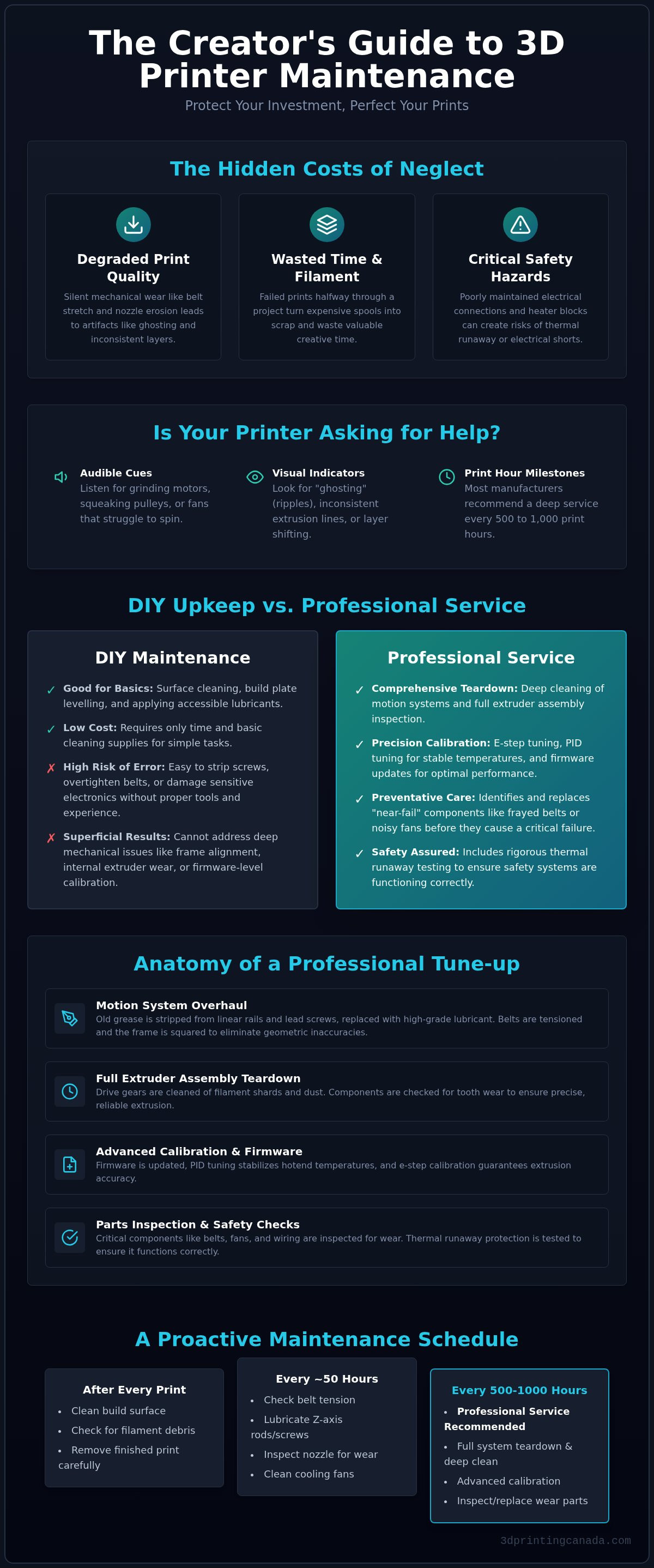
Your printer often tells you when it's struggling. Listen for audible cues like grinding motors, squeaking pulleys, or a fan that sounds like it's struggling to spin. Visual indicators are just as telling. Look for "ghosting" on the surface of your prints, inconsistent extrusion lines, or a frequent need to re-level the bed. Most manufacturers suggest a deep service interval every 500 to 1,000 print hours. If your machine has reached these milestones, it's time to realize that a professional 3D printer maintenance service is the best way to protect your creative investment.
What a Professional 3D Printer Maintenance Service Includes
A comprehensive 3D printer maintenance service goes far beyond a simple wipe-down of the frame. It's a deep dive into the internal mechanics of your machine to ensure every component works in perfect harmony. Technicians start with the motion system, stripping away old, contaminated grease from lead screws and linear rails. We replace it with high-grade lubricants that reduce friction and prevent the micro-stuttering that causes visible artifacts on your prints. This process also includes comprehensive belt tensioning and frame squaring to eliminate geometric inaccuracies that can make parts not fit together correctly.
The extruder assembly receives a full teardown. Over hundreds of hours, tiny shards of filament and dust accumulate inside the gears, leading to slipping or inconsistent flow. By cleaning these drive gears and checking for tooth wear, we ensure your extrusion remains precise and reliable. We also handle the technical heavy lifting, such as firmware updates and PID tuning. This calibration ensures your heater block's power cycles are stable, keeping your hotend at a rock-steady temperature and preventing thermal fluctuations that ruin surface finishes.
Advanced Calibration and Testing
Precision is the primary goal of any professional tune-up. Our team performs e-step calibration to confirm that when your software requests 100mm of filament, the hardware delivers exactly that amount. We also verify your safety systems through rigorous thermal runaway testing. This check ensures that if a heater or sensor fails, the printer shuts down immediately to prevent a hazard. Finally, we test bed levelling sensors and condition the build surface to guarantee that crucial first-layer adhesion every single time.
Parts Inspection and Replacement Strategy
The best way to avoid a mid-print disaster is to catch "near-fail" components before they break. Technicians inspect belts for subtle fraying and check cooling fans for bearing noise that signals imminent failure. Using genuine Bambu Lab accessories and high-quality replacement parts ensures your machine stays within factory specifications. If you want to keep your hardware running like a new machine, our technical support experts are ready to help. We ensure all cooling ducts are clear of debris, preventing the "heat creep" that leads to frustrating jams during long jobs.
DIY Maintenance vs. Professional Technician Services
Every 3D printer owner eventually faces a choice: do I fix this myself or seek professional help? Owning a printer usually means getting your hands a little dirty, and we encourage every maker to master the basics. Skills like bed levelling and cleaning the build plate are non-negotiable for consistent results. However, the jump from routine cleaning to a full mechanical teardown is where many people run into trouble. We frequently see machines arrive at our shop with stripped hex screws, overtightened belts, or damaged ribbon cables because a user tried to go too deep without the proper experience or tools.
The biggest difference between a hobbyist approach and a professional 3D printer repair service is the diagnostic methodology. While you might rely on a visual check or "gut feeling" to diagnose a ghosting issue, a professional technician uses precision tension gauges, multimeters, and specialized software to find the root cause. This eliminates the guesswork that often leads to buying unnecessary replacement parts. You should also consider the opportunity cost of your time. Is your weekend better spent designing your next big project or wrestling with a stubborn extruder assembly? For many, the peace of mind that comes with a professional 3D printer maintenance service is worth more than the hours spent troubleshooting.
When to Tackle it Yourself
Keep your DIY efforts focused on high-frequency, low-risk tasks that keep the machine running day-to-day. Nozzle swaps are a perfect example, as is the external cleaning of your build plate with isopropyl alcohol. You should also feel comfortable applying manufacturer-approved grease to your Z-axis lead screws every few months. If you own a modern high-speed machine, make a habit of running the built-in calibration routines weekly. These automated steps are designed to handle minor drift without needing a technician's intervention.
When to Call in the Experts
Some jobs require a specialist's touch to avoid turning a minor issue into a total hardware failure. If you're dealing with mainboard errors, complex wiring harness replacements, or a frame that's no longer square, it's time to call us. These tasks require specialized measurement tools and technical knowledge to ensure the machine remains safe and accurate. This is especially vital if your printer is a critical part of your business revenue. In those cases, minimizing downtime is your top priority, and a professional 3D printer maintenance service is the most efficient way to get back to production.
Establishing a Maintenance Schedule for Your Hardware
Consistency is the secret to reliable 3D printing. You wouldn't drive a car for thousands of kilometres without an oil change, and your printer is no different. We recommend a tiered approach based on your actual print hours rather than just the calendar. At the 100-hour mark, perform a quick visual inspection of all moving parts. By 500 hours, you should be deep-cleaning your motion system and checking for belt stretch. Once you hit the 1,000-hour milestone, it's time for a professional 3D printer maintenance service to ensure your machine isn't hiding deep-seated mechanical wear that could lead to a catastrophic failure.
Your local environment plays a massive role in hardware health. In many Canadian workshops, the dry winter air leads to increased dust accumulation and static issues. Conversely, humid summers can affect your filament and cause oxidation on non-coated metal components. Keep a dedicated Maintenance Log to track these variables alongside your print hours. This log becomes an invaluable resource for troubleshooting and helps you realize exactly when a component is nearing the end of its lifespan. If you want to keep your hardware in peak condition without the guesswork, consider our professional technical support to handle the heavy lifting.
High-speed machines, such as the Bambu Lab series, require more frequent attention than traditional printers. Because these units operate at extreme velocities, vibrations can loosen fasteners much faster than on a standard machine. If you're running a high-speed production farm, we suggest tightening your service intervals by about 25%. This proactive stance keeps your belts and motors from wearing out prematurely under the extra stress of rapid movement.
The Weekly Mini-Checklist
Spend fifteen minutes every week on these simple tasks to prevent major headaches later:
- Clean the build plate: Use high-percentage IPA to remove oils and ensure perfect first-layer adhesion.
- Inspect the nozzle: Look for external buildup or "blobs" that could catch on your prints and cause a layer shift.
- Check filament paths: Ensure there's no unnecessary friction or tangles in the PTFE tubes that could stress your extruder motor.
Quarterly Deep-Dive Tasks
Every few months, set aside an hour for a more thorough investigation of your hardware:
- Check belt tension: Look for signs of fraying or "rubber dust" near the pulleys, which indicates a misalignment.
- Lubricate motion components: Clean off old grease and apply a fresh layer of manufacturer-approved lubricant to lead screws and rails.
- Verify eccentric nuts: Ensure the carriage wheels are tightened correctly to prevent any wobble that causes "ringing" on your print surfaces.
Reliable 3D Printer Repair and Maintenance Across Canada
Finding a reliable 3D printer maintenance service shouldn't be a geographical challenge. At 3D Printing Canada, we've established ourselves as the national hub for expert technical support, serving creators from coast to coast. Our approach is brand-agnostic because we believe every maker deserves a machine that works every time. From entry-level Creality units to professional-grade Bambu Lab systems, our in-house technicians have the years of experience required to handle any mechanical or electronic hurdle. We don't just look at the surface; we dive into the guts of the machine to ensure it meets our rigorous performance standards.
We understand that shipping a precision tool across the country can feel daunting. That's why we've streamlined our intake process to be as simple and transparent as possible. Once your machine arrives at our technical centre, it's treated with the highest level of care by a team that treats your hardware like their own. Every service we perform comes with a workmanship guarantee. This provides you with the peace of mind that your hardware has been calibrated, tested, and verified by professionals who genuinely care about your creative success.
The 3D Printing Canada Advantage
What sets us apart is our deep connection to the maker community. Our technicians are active participants in the 3D printing world, so they understand the specific pains of a failed 10-hour print or a clogged extruder. Because we maintain a massive inventory of filaments and spare parts, we can often complete repairs and maintenance much faster than shops that have to order components from overseas. Our goal is empowerment. We don't just fix your machine; we provide the support and education you need to keep it running smoothly long after it leaves our shop.
How to Get Started with Your Service
Ready to give your hardware the attention it deserves? Booking a diagnostic or maintenance appointment is a straightforward process. Visit our website to select your service and provide details about your machine's current performance and any specific issues you've noticed. When it's time to send your printer to us, use the original packaging if you still have it. If not, ensure the machine is secured with plenty of padding and that the moving parts are zip-tied to prevent shifting during transport. This ensures your creative investment arrives in perfect condition for its tune-up.
Book your 3D printer maintenance service today and keep your creative flow uninterrupted. We are here to be your dependable partner in every layer of your 3D printing journey.
Keep Your Creative Momentum Moving
Your 3D printer is the heart of your workshop. Keeping it in top shape is about more than just avoiding clogs; it's about ensuring every layer is as precise as the first. By following a structured maintenance schedule and knowing when to call in the experts, you protect your investment and eliminate the frustration of mid-print failures. We've explored how a professional 3D printer maintenance service provides the technical deep-dive that standard DIY cleaning simply can't match.
Our experienced in-house technicians are ready to support makers across the country with fast national shipping and a workmanship guarantee on every job. We don't just fix machines; we restore your peace of mind so you can focus on what you do best: creating. Don't let maintenance debt slow down your next big project. Get your printer back in peak condition—book a maintenance service now! We're here to help you push the boundaries of what's possible with your hardware.
Frequently Asked Questions
How often should I have my 3D printer professionally serviced?
Professional servicing is recommended every 500 to 1,000 print hours or at least once per year. High-speed machines often require more frequent check-ups because rapid movements can loosen fasteners and wear out belts faster than traditional models. Regular check-ups help identify silent mechanical wear before it causes a major failure. This proactive approach ensures your hardware remains reliable for long projects and maintains the high-quality surface finishes you expect from your creative investment.
What is the difference between a 3D printer repair and a maintenance service?
Repair is a reactive process focused on fixing a specific component that has already failed. In contrast, a 3D printer maintenance service is a proactive regimen designed to prevent those failures from happening. It includes deep cleaning, lubrication of the motion system, and full calibration of the extruder and bed. While a repair gets you back up and running, maintenance ensures your machine operates at peak efficiency and lasts much longer by reducing overall wear.
Can I perform maintenance on my Bambu Lab printer myself?
You can certainly handle basic tasks like cleaning the build plate or swapping nozzles. Bambu Lab machines also have built-in calibration routines that help with daily upkeep. However, complex mechanical work on the motion system or intricate internal wiring is best handled by experts. Professional technicians have the specialized tools and experience to perform deep-dives without the risk of stripping screws or damaging the sensitive sensors found in these high-speed units.
Does 3D Printing Canada service all brands of 3D printers?
We provide technical support for all major 3D printer brands and models across the country. Our in-house technicians have years of experience working on everything from entry-level Creality machines to professional Bambu Lab systems. Whether you have a hobbyist-grade FDM printer or a prosumer model, our team has the technical knowledge to perform deep-cleaning and precise calibration. We treat every machine with the same level of care to ensure it meets our performance standards.
How much does a typical 3D printer maintenance service cost in Canada?
The cost for professional servicing in Canada generally depends on the complexity of your machine and the depth of the work required. High-end professional units often involve more detailed teardowns and calibration steps than basic entry-level models. Some service providers offer tiered preventative maintenance plans for popular brands to make upkeep more predictable. We suggest contacting a technician to discuss your specific hardware and current print hours for a more accurate assessment of your needs.
What happens if the technician finds a broken part during maintenance?
If a technician identifies a "near-fail" or broken component during a routine check, they will contact you with a detailed explanation. We prioritize transparency and will provide a quote for any necessary spare parts and the labour required to install them. Because we keep a massive inventory of filaments and Bambu Lab accessories, we can often source the required components quickly to minimize your downtime. No additional work is performed without your explicit approval.
How long does it typically take to get my printer back from service?
Turnaround times fluctuate based on our current shop volume and the complexity of the service required. A standard 3D printer maintenance service is usually completed faster than a complex repair that might require specialized troubleshooting. We aim to get your machine back into your workshop as quickly as possible without rushing the calibration process. You can check with our team for the most current estimates based on our national shipping and support schedules.
Is it better to maintain my old printer or just buy a new high-speed model?
Maintaining your current hardware is often the most cost-effective way to achieve consistent results if the frame is still square and solid. Regular servicing can make an older machine feel like new by improving extrusion and motion smoothness. However, if your production needs have outgrown your current speed or build volume, an upgrade to a newer high-speed model might be the right move. We can help you evaluate your current printer's health to make that decision.