
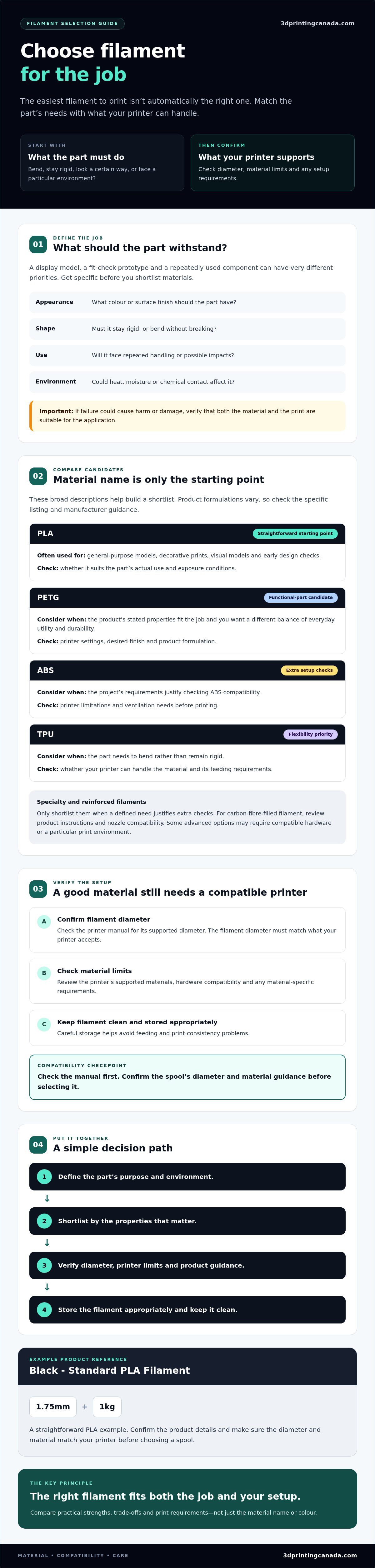
The easiest filament to print isn’t automatically the right choice for your project. If you’re comparing filaments, it’s tempting to start with a familiar material like PLA. But a decorative model, a flexible component and a part exposed to heat can have very different requirements. Even the right material won’t help if its diameter doesn’t match your printer.
Choose by balancing what the part needs with what your machine can handle. This guide compares common materials such as PLA, PETG, TPU and ABS, and explains how to check diameter, printer compatibility, storage and print setup. Start by listing what the part needs to do, then use those requirements to narrow the options. As you compare materials, colours and diameters, review the specifications in 3D Printing Canada’s filament collection and confirm they match your printer. The right choice is the one that fits both the job and your setup.
Key Takeaways
- Define what the printed part needs to do before choosing a material, from staying flexible to handling impact or heat.
- Compare filaments by their practical strengths, trade-offs and print difficulty, not just by material name or colour.
- Check your printer’s manual and confirm its supported diameter and material limits before selecting a spool.
- Keep filament clean and stored appropriately to help avoid feeding and print consistency problems.
- Use Black - Standard PLA Filament - 1.75mm, 1kg as a straightforward PLA example, and verify product details before purchase.
Start with the part: what should your filament be able to do?
Decide what the printed part must do before choosing a material. A display model, a fit-check prototype and a component used repeatedly have different priorities. Start with the job, then shortlist filaments by the properties that matter. A material name is a useful starting point, but it doesn’t guarantee how every finished part will perform.
Be specific about the requirements instead of asking whether a material is simply “strong” or “durable.” Appearance and surface finish matter for a decorative piece. Stiffness matters when a part must hold its shape, while a flexible part needs to bend without breaking. For an impact-prone part, consider how it may tolerate knocks. Also account for exposure to heat, moisture or chemicals. The part’s shape, print settings and overall print quality can affect its performance, too.
What will the printed part need to withstand?
Think through the part’s environment and use. Will it sit on a shelf, help you test a design, or be handled and used repeatedly? Note whether it may bend, get bumped, warm up, become damp or contact a particular substance. These answers help narrow the material choices and prevent you from choosing by colour or familiarity alone. If failure could cause harm or damage, verify that the material and print are suitable for that application.
Use this quick checklist to define your priorities:
- Appearance: What colour or finish should the part have?
- Shape: Does it need to stay rigid, or bend without breaking?
- Use: Will it face repeated handling or possible impacts?
- Environment: Could heat, moisture or chemical contact affect it?
Which filament family is a sensible starting point?
PLA is an accessible starting category for many decorative prints and prototypes, but it isn’t right for every job. Consider PETG when exploring options for a functional part, ABS when the project calls for different material characteristics, or TPU when flexibility is a priority. Treat each as a candidate to investigate, not a guaranteed solution. Check the specific product guidance and your printer’s capabilities before deciding.
Engineering materials and composites require extra checks. First define the property you need, then confirm your printer can meet the material’s requirements. Some advanced options may need compatible hardware or a particular print environment. Don’t choose a specialized filament just because it sounds tougher. Match the material to the part, and verify the setup before you buy or print.
Compare filament materials by properties, not by name alone
Material names help you narrow the options, but they don’t tell the whole story. Compare the finish you want, how rigid or flexible the part needs to be, what your printer can handle and what conditions the part will face. Formulations vary between products, so use these broad descriptions to build a shortlist, then check the individual product listing and manufacturer guidance before deciding.
| Material family | Broad characteristics | Worth investigating for | Trade-offs to check |
|---|---|---|---|
| PLA | Often a straightforward option for general-purpose models and prototypes; available in varied colours and finishes. | Decorative prints, visual models and early design checks. | Confirm it suits the part’s real use and exposure conditions. |
| PETG | A candidate when you want a different balance of everyday utility and durability. | Functional parts where the product’s stated properties match the job. | Check printer settings and the finish you want; product formulations differ. |
| ABS | A material to consider for specific project demands, with printer setup requiring extra attention. | Parts whose requirements justify checking ABS compatibility. | Verify printer limitations and ventilation needs before printing. |
| TPU | A flexible material family. | Parts that need to bend rather than remain rigid. | Confirm your printer can handle the material and feeding requirements. |
When should you shortlist PLA, PETG, ABS or TPU?
Start with PLA for a general model or prototype, but don’t assume it suits a part that must withstand a particular environment or repeated use. Consider PETG if the product’s stated properties fit your functional part. Shortlist ABS or TPU when their characteristics match a clear requirement and your printer supports the material. A dedicated PLA-versus-PETG guide can help with a closer comparison when available.
When do specialty and reinforced filaments make sense?
Consider specialty options when a defined need justifies the extra setup checks. Carbon-fibre-filled filament may suit a project with specific performance goals, but check product instructions and nozzle compatibility because reinforced materials can be abrasive. Nylon and polycarbonate are engineering categories, not automatic upgrades. They may call for equipment or a workflow beyond a beginner setup, so verify your printer’s requirements first.
Use these distinctions to narrow your search, then browse filament materials and options and compare each listing’s stated properties with your project requirements.
Check filament diameter and printer compatibility before buying
A spool can match your project and still be wrong for your printer. Check compatibility before adding filaments to your cart. The collection includes 1.75 mm and 2.85 mm options, but that doesn’t mean every printer supports both. These diameters aren’t interchangeable unless the printer is designed to use the one you select.
Use this purchase sequence to confirm the fit:
- 1. Read the printer manual. Find the manufacturer’s stated filament diameter and material requirements for your exact printer.
- 2. Match the diameter. Compare the supported measurement with the exact product listing and spool details. Don’t assume an adapter or software setting can make incompatible hardware work.
- 3. Check material limits. Confirm that the extruder and hot end support the selected material. Review manufacturer guidance for any enclosure or build-surface requirements, too.
- 4. Verify the listing. Check the product’s stated diameter and material-specific temperature and setup recommendations before printing.
Follow the printer maker’s documentation for model-specific requirements. A product category or diameter offered by a retailer doesn’t confirm that a particular printer can use it.
How do you confirm the correct filament diameter?
Start with the manual or the printer manufacturer’s specifications, rather than guessing based on another machine you own. Then match that measurement to the individual product listing. Different sizes may be available within the same material family, so check the exact option selected and its spool details before ordering. If the supported diameter isn’t clear, confirm it with the printer manufacturer before buying.
Can your printer handle the selected material?
Diameter is only one part of compatibility. Check whether the printer’s hot end and extruder can handle the material, and follow the manufacturer’s advice on enclosure and build-surface needs. Compare those requirements with the product’s instructions. General material guidance may not be enough, since formulations and recommended print settings can vary between products.
If your printer’s capabilities are unclear, or the hardware isn’t working as expected, pause before trying a new material. 3D Printing Canada provides professional 3D printer repair services that may help address hardware concerns. Confirm that any service is appropriate for your situation. It isn’t emergency or on-site support.
Avoid common filament buying mistakes and plan for storage
A striking colour can catch your eye, but it won’t tell you whether a spool suits the part or your printer. Before buying, confirm the material and diameter, then check the printer’s documented limits. Overlooking one of these details can leave you with a spool that doesn’t feed correctly or can’t be printed on your setup.
Filament condition matters after purchase, too. Dust or moisture may interfere with feeding and print consistency, so plan where the spool will live before opening it. If you’re trying a material or brand for the first time, start with one suitable spool. Test it with your project and workflow before committing to multiple colours or a specialty material.
What should you verify on a filament product listing?
Read the specific listing instead of relying on a collection filter or familiar product name. Confirm the exact material, diameter, spool weight and colour, along with any compatibility notes. Compare the manufacturer’s product guidance with your printer’s documented limits, and check that the selected spool option matches what you intend to order.
Product specifications, filters and stock status can change. Recheck the listing when you’re ready to purchase, especially if you saved a product or are ordering again after a gap. If a key detail isn’t clear, seek confirmation before placing the order.
How can you keep filament in usable condition?
Store spools in an airtight container or resealable bag with desiccant. Keep them away from dust, direct sunlight and heat sources, and follow the material-specific storage guidance provided with the product. Label each spool with its material and colour so you can identify it without opening several packages.
Good storage is a simple habit. Return the spool to its sealed container after use, and avoid leaving it exposed near a window or warm appliance. For materials with extra handling instructions, follow the manufacturer’s advice instead of assuming one storage routine suits every type.
Ready to compare material, colour and diameter options? Browse 3D printer filaments, then verify the exact listing details and your printer’s requirements before choosing a spool.
Compare standout filaments in the collection and choose your next spool
Once you have a material direction and a shortlist of compatible options, compare products by their listed details. These examples show how material, diameter and spool weight can help narrow your choice. They aren’t performance endorsements, and product details may change, so verify the current listing before ordering.
Which collection examples suit different shopping needs?
| Product | Material | Diameter | Spool weight | Shopping context |
|---|---|---|---|---|
| Black - Standard PLA Filament - 1.75mm, 1kg | PLA | 1.75 mm | 1 kg | A straightforward general-purpose PLA example for models and prototypes, subject to your printer and project requirements. |
| Black - Standard PETG Filament - 1.75mm, 1kg | PETG | 1.75 mm | 1 kg | Consider as a different material option; check its product guidance for intended use and setup. |
| Black - Standard TPU 90A Filament - 1.75mm, 1kg | TPU 90A | 1.75 mm | 1 kg | A flexible-material option to investigate if your project calls for bending rather than rigidity. |
| Carbon Fiber (10%) - Standard PETG Filament - 1.75mm, 1kg | Carbon-fibre-filled PETG | 1.75 mm | 1 kg | A specialty option. Verify product instructions and printer hardware compatibility before choosing. |
| Black - Standard ABS Filament - 1.75mm, 1kg | ABS | 1.75 mm | 1 kg | Research against your project demands and printer’s material requirements. |
Use the standard PLA listing as a comparison starting point, not a guarantee that it suits every machine or application. PETG and TPU represent distinct material choices, so let the part’s required behaviour guide which listing you investigate. Assess carbon-fibre-filled PETG and ABS more carefully against both the job and your printer’s documented limits. Confirm all specifications and current product details on the listing.
What is the simplest way to move from shortlist to purchase?
Before adding a spool to your cart, recheck your printer manual, confirm the exact diameter and review the selected product’s details. If you need a deeper material comparison, look for dedicated PLA-versus-PETG and TPU guides as they become available. The right choice is the one that fits your part and setup, not simply the most specialized option.
Ready to narrow it down? Browse the filament collection by material, colour and diameter, then confirm the specific listing matches your shortlist.
Choose your next spool with confidence
Start with the part, not the colour or a familiar material name. Decide whether your print needs to be rigid, flexible, impact-resistant or suited to particular conditions, then compare materials against that job. PLA, PETG, ABS, TPU and specialty filaments each need their own checks, and product formulations can vary.
Before buying, confirm your printer’s supported diameter and material requirements in its manual. The collection includes 1.75 mm and 2.85 mm options, but check the exact product listing and make sure your printer supports the selected diameter. Review the product’s setup guidance, too, and store your spool as directed to help keep it in usable condition.
Ready to choose your next spool? Browse filaments and compare materials across standard and specialty categories. Match the listing to your project and printer before ordering. A clear shortlist can help you make a more confident choice and get back to printing.
Frequently Asked Questions
Which filament is best for beginners?
PLA is often a practical starting point for everyday models and prototypes, but the best choice depends on your printer and project. Check your printer manual for supported filament diameter and material requirements before choosing a spool. Then review the product specifications. If your part needs to bend, tolerate heat or meet another specific requirement, compare suitable alternatives instead of assuming PLA will do the job.
How do I know whether my printer uses 1.75 mm or 2.85 mm filament?
Check your printer manual or manufacturer’s specifications for its supported filament diameter, then match that measurement to the exact product listing. The collection includes both 1.75 mm and 2.85 mm options, but each spool is supplied in a specified diameter. These sizes aren’t interchangeable unless your printer supports the one you select. Confirm the spool details before ordering, even if you’ve bought filament before.
Can I use PETG in any 3D printer?
No, PETG isn’t automatically compatible with every printer. Check the manufacturer’s material guidance and confirm that your machine’s hot end, build surface and setup meet the specific filament’s requirements. Verify the spool diameter as well. If your printer manufacturer doesn’t list PETG as a supported material, seek reliable guidance before printing rather than assuming that a printer capable of PLA can handle it.
What is the difference between PLA and PETG filament?
PLA and PETG are different material families, and neither is right for every project. Compare the properties your part needs, such as rigidity, durability and finish, alongside what your printer can support. Product formulations and guidance can vary, so check the individual specifications instead of relying only on the material name. For a closer look at the differences, consult a dedicated PLA-versus-PETG guide when available.
How should I store 3D printer filament?
Store filament in an airtight container or resealable bag with desiccant, away from dust, direct sunlight and heat sources. Label each spool so you can identify its material later, and follow any storage instructions from the filament maker. Good storage helps protect a spool between prints, but it can’t reverse damage caused by poor conditions. Check the material-specific guidance if you’re unsure how to store a particular spool.
Is carbon-fibre filament compatible with a standard 3D printer?
Not necessarily. Compatibility depends on the exact carbon-fibre-filled filament and your printer’s hardware. Before buying, review the product specifications and printer manufacturer’s recommendations, including any nozzle and hot-end requirements. Don’t assume a machine that prints standard PLA can run every reinforced material. Confirm that the printer supports the selected spool and follow product-specific setup guidance before starting a print.
Should I buy several spools of filament at once?
Start by confirming that each spool’s material and diameter suit your printer and planned projects. If you haven’t tested a material or product before, consider beginning with one spool rather than buying several colours or specialty filaments at once. Think about your storage space, too. Collection details and stock can change, so check the exact product specifications and current listing before ordering multiple spools.