
A printer that stops mid-project doesn’t automatically belong on the replacement list. If you’ve searched for “3D printer repair services Canada,” this guide will help you decide whether to troubleshoot, arrange maintenance, or seek professional repair.
The right choice depends on the fault, the time you can afford to lose, and the printer’s value to you. Basic setup issues may be manageable with straightforward checks. Persistent faults involving heating, movement, or electronics need more caution. 3D Printing Canada provides professional 3D printer repair when troubleshooting isn’t enough.
Compare common repair paths, learn when to stop troubleshooting, and prepare a clear repair request. Details such as the printer model, symptoms, and steps you’ve already tried can help explain the problem and support a more informed repair-or-replace decision.
Key Takeaways
- Use safety and fault complexity to decide whether basic troubleshooting is appropriate or it’s time to seek expert help.
- Know whether you need a fault repaired, routine maintenance, or an optional performance upgrade before choosing a repair path.
- Compare DIY troubleshooting, maintenance, and technician-led repair against your skill level, downtime needs, and printer’s value.
- Prepare a clear repair request with your printer model, material, settings, error messages, symptoms, and recent changes.
- When troubleshooting becomes complex, 3D printer repair services Canada can be a practical route to getting your printer working again.
When Do 3D Printer Repair Services Make More Sense Than DIY Fixes?
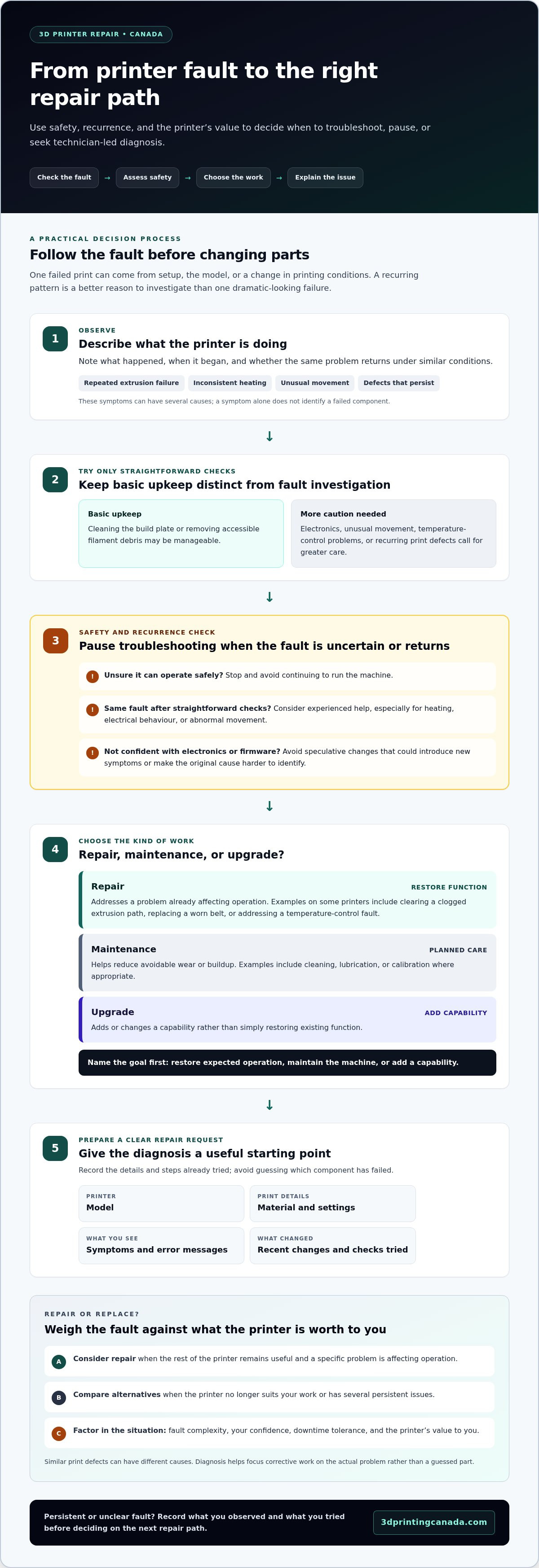
Before reaching for tools or changing settings, consider whether the fault is safe and simple enough to troubleshoot. Routine upkeep, such as cleaning the build plate or removing accessible filament debris, is different from investigating electronics, unusual movement, temperature-control problems, or print defects that keep returning.
A single failed print may result from setup, the model, or a change in printing conditions. If the same error appears across several attempts, look for a recurring pattern rather than treating each failure as bad luck. Repeated problems can point to an underlying fault that needs investigation. Professional repair involves technician-led diagnosis and corrective work to address a printer that isn’t operating as expected.
Which 3D printer symptoms suggest a more complex fault?
Watch for repeated extrusion failures, inconsistent heating, unusual movement, or print defects that persist after basic checks. These symptoms can have several causes, so they don’t identify a failed component on their own. Whether the problem recurs under similar conditions is often more useful than how dramatic one failed print looks.
Before changing multiple settings or replacing parts, record what happened, when it began, and whether it repeats. This helps distinguish a one-time setup issue from a recurring problem and gives a technician a clearer starting point.
When should you stop troubleshooting and seek repair?
Pause if you’re unsure the printer can operate safely or the same fault returns after straightforward checks. This is especially important when symptoms involve heating, electrical behaviour, or abnormal movement. Continuing to run the machine or making speculative changes could add damage or make the original cause harder to identify.
Be cautious with electronics work and firmware changes if you’re not confident in the process. Changing settings or components without a clear reason can introduce new symptoms and complicate diagnosis. Record what you’ve tried, then consider whether experienced help is the practical next step. 3D printer repair services Canada can help when a fault is persistent or beyond your comfort level. 3D Printing Canada provides professional repair conducted by experienced technicians.
For a broader overview of repair considerations, see the 3D printer repair reference guide. Handle simple upkeep yourself, but don’t let repeated or uncertain faults turn into a bigger problem.
What Can a Professional 3D Printer Repair Service Address?
A repair investigates and corrects a fault that stops a 3D printer from operating as expected. Depending on the machine and its symptoms, the issue may involve mechanical parts, electronics, temperature control, extrusion, sensors, or software. These are common fault areas, not a claim that every component or repair applies to every model.
Similar symptoms can have different underlying causes. A printer that stops extruding, for example, may have an issue in the filament path, a setting, or another part of the system. Treat the symptom as a starting point for investigation, not proof that a particular component needs replacing.
That distinction matters when deciding whether to repair or replace. Consider the printer’s overall condition, the scope of the fault, and whether the machine still meets your needs. If the rest of the printer remains useful, fixing a specific problem may make more sense than replacing the whole machine. If it no longer suits your work or has several persistent issues, weigh repair against choosing a different printer.
How do repair, maintenance, and upgrades differ?
Repair addresses a problem that’s already affecting function. Examples on some printers include clearing a clogged extrusion path, replacing a worn belt, or addressing a temperature-control fault. Maintenance is planned care to reduce avoidable wear or buildup, such as cleaning, lubrication, or calibration where appropriate. An upgrade adds or changes capability rather than simply restoring existing function. These categories can overlap, but identifying your goal helps keep the work focused.
Why does fault diagnosis matter before replacing parts?
Different problems can produce similar print defects. Under-extrusion, for example, may be related to the material, settings, extrusion path, or another issue. Uneven heating can also have more than one possible cause. Replacing a part based on appearance alone may leave the original fault unresolved and introduce another variable.
A technician-led assessment helps identify what needs attention before parts are changed. It can also distinguish repair from routine upkeep or an optional upgrade, so the work addresses the printer’s actual problem rather than a guess.
For complex or recurring faults, professional 3D printer repair from experienced technicians can be a practical next step. 3D Printing Canada provides repair support for printers that need informed diagnosis and corrective work. If you’re comparing 3D printer repair services Canada, ask what the work is intended to do: restore expected operation, maintain the machine, or add a capability you want.
How to Compare 3D Printer Repair Options in Canada
Choose a repair path that fits the fault and the consequences of waiting. A simple setup check may be enough for a low-risk issue. A recurring or unclear problem may call for technician-led attention, particularly if the printer supports regular production. Compare the options against the fault’s complexity, your confidence, downtime tolerance, and the printer’s value to you.
| Option | Best fit | Skill and downtime | Consider the printer’s value |
|---|---|---|---|
| DIY troubleshooting | Low-risk checks, such as reviewing settings, confirming the setup, or cleaning accessible areas according to the printer’s instructions. | Requires enough confidence to follow safe, model-appropriate steps. It can suit a flexible schedule, but repeated trial and error may extend downtime. | Reasonable for a machine you understand and can safely inspect. Avoid speculative changes that could complicate a fault in a valuable printer. |
| Routine maintenance | Planned care, such as cleaning, lubrication, or calibration where appropriate, rather than correcting a fault that has already stopped expected operation. | Needs basic familiarity with the machine and a suitable maintenance routine. Scheduling upkeep can help reduce avoidable interruptions. | Useful for maintaining a printer that remains important to your work, learning, or projects. |
| Technician-led repair | Recurring, technical, or unclear problems that are difficult to isolate or may involve electronics, motion, or temperature control. | Professional diagnosis is a good fit when troubleshooting has reached its limit or downtime matters. 3D Printing Canada provides technician-led repair for printer faults. | Consider it when the printer still serves a useful role and the fault appears focused enough to investigate. |
Which repair path fits the fault and your priorities?
Start with the least invasive safe step. Confirm that the intended material and settings are selected, review the printer’s instructions, and note whether the issue repeats. If it does, or the cause remains unclear, stop cycling through guesses. For production work, an extended troubleshooting detour may cost more in lost time than seeking expert attention. If you print occasionally for hobbies, you may have more time to try simple checks first.
When is repair more practical than replacing a printer?
There’s no single rule. Consider the printer’s overall condition, the scope of the fault, and what you need it to do. A machine used for specialized work, learning, or a valued personal project may be worth preserving for reasons beyond resale or replacement value. A printer with several persistent problems, or one that no longer suits its intended use, may call for a broader rethink.
Compare the likely repair needs with the value the machine provides, including the time and disruption involved. If you’re weighing 3D printer repair services Canada, this framework keeps the decision grounded in your priorities rather than the symptom alone.
How to Prepare for 3D Printer Repair: A Practical Checklist
A clear repair request gives a technician useful context. Gather the details below and stick to what you observed rather than guessing which part has failed. This turns “it’s not printing properly” into a more useful description of the fault.
What information helps explain a 3D printer fault?
- 1. Identify the printer. Record the make and model, plus its approximate age if you know it. Note recent maintenance, replaced parts, moves, or other changes.
- 2. Describe the print setup. Include the material, relevant print settings, and whether the issue occurs with a particular file or across different jobs. Record the settings you used without worrying about interpreting each one.
- 3. Explain the symptom plainly. Describe what the printer does, what you expected it to do, and when the issue occurs, such as during warm-up, the first layer, or partway through a print.
- 4. Track how often it happens. Note whether it was a one-time event or has repeated, and whether the conditions were similar. Copy any error messages exactly as shown.
- 5. Preserve useful evidence. Keep a failed print or take clear photos of the result, screen message, or visible issue if available. Avoid including personal or sensitive information in images or notes.
What should you do before handing over troubleshooting?
Pause testing if the printer may be unsafe to operate or another attempt could worsen the fault. Don’t dismantle unfamiliar components just to collect more evidence. Write down each troubleshooting step you’ve tried and what happened afterwards, including settings or firmware changes. This helps avoid repeating tests and gives the repair process a useful starting point.
If your notes relate to Bambu Lab equipment and you need background on related parts, refer to the Bambu Lab accessories and parts guide. Keep your repair request focused on the fault itself.
Ready to put your notes to use? Explore professional 3D printer repair services from experienced technicians. A clear description makes the repair discussion more focused, whether the issue is intermittent or has stopped a project. If you’re seeking 3D printer repair services Canada, start with the model number, a symptom timeline, and a record of changes.
Choose 3D Printer Repair Services That Help You Get Back to Printing
Your next step depends on four things: the fault’s complexity, how much downtime you can manage, the printer’s value to you, and your confidence troubleshooting it. Simple, low-risk checks may be manageable on your own. If the fault is recurring, unclear, or beyond your comfort level, professional help may be more practical than testing random changes.
A hobby printer may support personal projects or learning. A professional printer may be part of a regular workflow. Either way, consider the machine’s role and condition alongside the fault. That’s a more useful basis for choosing among 3D printer repair services Canada than relying on one symptom alone.
What makes a repair service useful to hobbyists and professionals?
Useful repair support starts with clear technical communication and a practical understanding of 3D printing equipment. You should be able to explain what the printer is doing, what changed, and how the problem affects your work without identifying the failed component yourself. Symptom notes, error messages, and examples of affected prints can make the discussion more specific.
3D Printing Canada provides professional 3D printer repair conducted by experienced technicians. Sharing your observations gives them useful context about the issue and your priorities, whether you’re trying to resume a personal project or reduce disruption to regular printing.
What is the next step when your printer needs expert attention?
Gather the printer’s make and model, a brief fault history, any error messages, and the troubleshooting steps you’ve already tried. Be clear about your priority: understanding a recurring problem, addressing a fault that has stopped printing, or deciding whether the machine still suits your needs. If safe operation is uncertain, pause testing and include that concern in your notes.
Complex or persistent faults are a sensible point to consider technician-led repair. Keep your description factual and concise so it focuses on what’s happening without assuming a diagnosis. Ready to take the next step? Explore 3D printer repair services.
Make a Confident Choice and Get Back to Printing
Choose your next step by weighing the fault’s complexity, the downtime you can manage, your confidence with troubleshooting, and the printer’s value to your work. Simple upkeep may be manageable on your own, while recurring or unclear problems are better candidates for professional attention. Before requesting help, gather the model details, error messages, and notes on what you’ve already tried.
If you’re comparing 3D printer repair services Canada, 3D Printing Canada provides professional repairs conducted by experienced technicians and serves customers nationally. Clear notes about the symptoms and your priorities can make the repair discussion more useful.
Ready to take the next step? Explore 3D printer repair services and get expert help moving towards your next successful print.
Frequently Asked Questions
How much do 3D printer repair services cost in Canada?
There isn’t one standard price for 3D printer repair services Canada. The work depends on the printer, the fault, and what’s needed to address it. Before comparing repair with replacement, establish the likely scope of the work. Describe your printer model, symptoms, error messages, and troubleshooting steps already attempted. A clear history explains what needs attention without relying on guesswork or an assumed repair price.
Is it worth repairing a 3D printer instead of replacing it?
Repair can make sense if the printer is in good condition and still suits your needs. Consider whether the fault seems isolated or keeps returning, how important the machine is to your projects, and how comfortable you are troubleshooting it. A printer’s value may also be personal, educational, or tied to specialized use. For complex or recurring faults, professional assessment can help inform the repair-or-replace decision.
Can a 3D printer repair service fix any brand?
The model and fault details matter more than the brand name alone when describing a repair need. Share the full model information and a clear fault history to put the symptoms in context. 3D Printing Canada provides professional 3D printer repairs conducted by experienced technicians. Describe what the machine is doing rather than assuming which component has failed.
When should I stop troubleshooting my 3D printer?
Stop troubleshooting if the same fault keeps returning, the cause remains unclear, or further testing could damage the printer or create a safety concern. Simple setup checks may be reasonable, but electronics, firmware changes, or recurring temperature problems can be more complex. Note what happened and which checks you tried. If you’re looking for 3D printer repair services Canada, those details help explain why you’re seeking professional support.
What information should I provide for a 3D printer repair?
Share the printer’s make and model, the material and settings used, any error messages, and a plain-language description of the fault. Note when it began, whether it happens repeatedly, and any recent changes, such as maintenance or a replaced part. Photos of an error message or print result can add context. Include the troubleshooting steps you’ve tried and what happened after each one.
Can regular maintenance prevent 3D printer breakdowns?
Regular maintenance can help limit problems related to dirt, wear, or neglected adjustments, but it can’t prevent every fault. Follow maintenance guidance suited to your printer and how you use it. Cleaning or calibration may support reliable operation, but neither replaces repair when a fault persists or becomes complex. Keep a record of maintenance and changes, since that history can help distinguish routine upkeep from a problem that needs corrective attention.
Is a clogged nozzle a reason to use a 3D printer repair service?
A nozzle clog may be manageable with appropriate basic troubleshooting, but repeated clogs or ongoing extrusion problems deserve closer attention. Follow the printer manufacturer’s guidance and avoid forcing tools or replacing parts without understanding the cause. If the issue returns, record when it occurs, what material and settings you used, and what you tried. That information can help a technician assess whether the problem extends beyond a routine clog.